Black Ops Zombies — browser guide
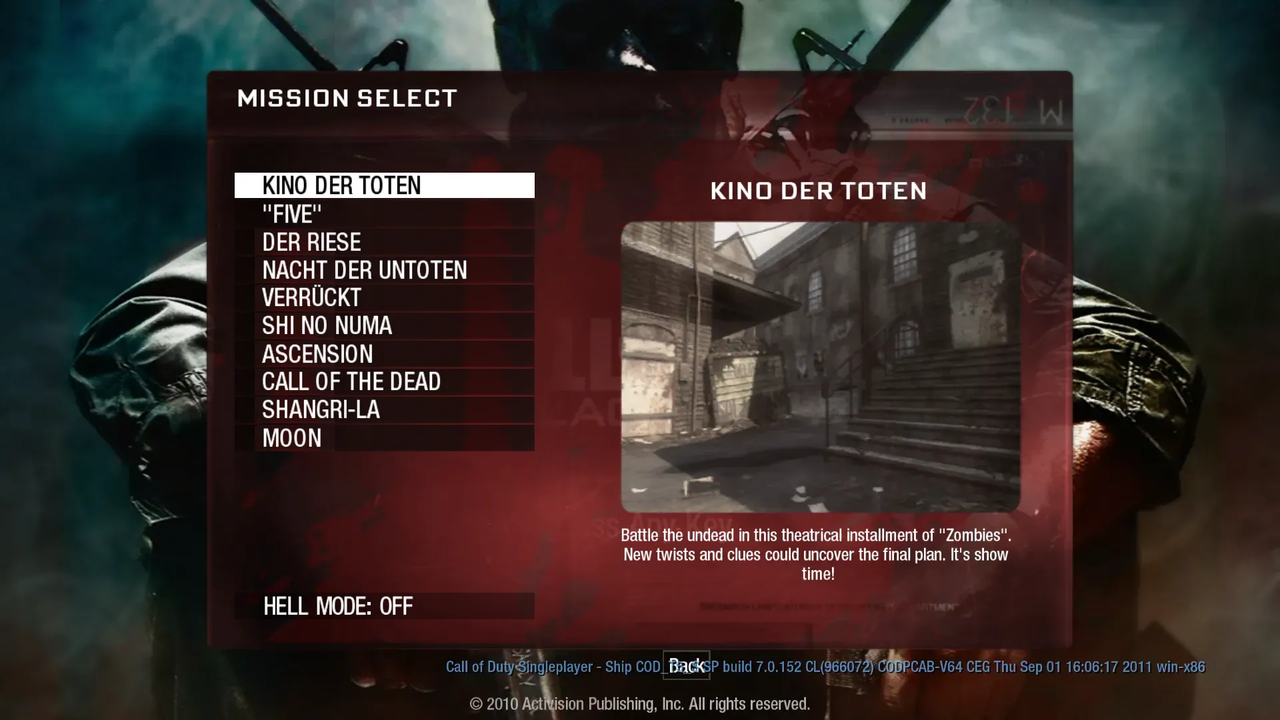
The BO1 Zombies browser project has a map-selection screen covering Kino der Toten, Five, Der Riese, Nacht der Untoten, Verrückt, Shi No Numa, Ascension, Call of the Dead, Shangri-La and Moon. Start here for the Zombies entry in the Radiant list.
What this project offers
This is a Zombies project with separate map choices, rather than a general Call of Duty multiplayer launcher. The host publishes the ten map names in its current project metadata; map availability can change with the release.
Requirements
- Open the original vel.gg project in a desktop browser.
- Follow the current map loader and its resource prompts; the directory does not supply game data.
How to start
- Open the original project link.
- Choose a map from the project’s map-selection screen.
- Wait for that map’s resources and consult its input instructions before starting.
Documented controls
Use the original project’s current control screen. We do not infer keyboard bindings from the retail game.
Project-specific loading notes
- Moon and Kino are named inside this host’s map list. The separate pages.dev URLs from the viral thread did not respond during our review, so they are not duplicate playable listings here.
- The presence of a map selector does not prove every map or round has been tested.
Common questions
Where is Kino der Toten?
The original BO1 project lists Kino der Toten among its map choices. Open that host and use its current selector rather than an unverified mirror.
Is this the full Black Ops game?
This entry is the Zombies browser project. It is not a promise of the complete retail campaign or competitive multiplayer.
Sources & image credit
Project credits: vel.gg community project
- Original project and current instructions
- Original RadiantOpti source thread
- Cover image source — Project-published image
Source review: . Project interface and documentation reviewed; full gameplay not completed